


Wordy Christmas Tree (250354)
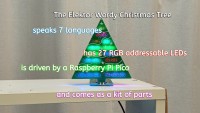
A multilingual LED decoration powered by a Raspberry Pi Pico.
Each year Elektor designs a new Christmas project, and this time the result is the Wordy Christmas Tree, a beautifully engineered, multilingual LED decoration powered by a Raspberry Pi Pico.
Although LED Christmas trees are nothing new, this one adds a distinctive twist: it gently illuminates seasonal greetings in seven languages, each word precision-milled into the front panel. The lighting is refined and silent — no jingles, no beeps — just tasteful RGB animations.
The tree is a fully 3D construction made from eleven PCBs: a base board with the Pico, a front and rear panel, and eight internal “bone” boards that form the LED frame. These inner boards divide the tree into separate light compartments so each word can glow independently. Twenty-seven addressable RGB LEDs provide soft, controlled illumination.
Designing the tree required careful engineering, from manually drawing each milled letter in KiCad to refining the internal structure for optimal lighting. Earlier prototypes placed LEDs behind the panel, but the final design mounts them inside the skeleton for more even illumination and easier assembly.
The software is built on the Arduino environment using the Adafruit NeoPixel library. The Pico controls the LEDs through a display-style buffer, enabling smooth fade effects and customizable colour sequences. Each greeting is shown word-by-word in a calm, elegant animation.
While the PCBs are green, giving green light a natural boost, the system balances brightness automatically by driving red and blue harder. Because all 27 LEDs at full white can draw substantial current, a 5-V supply capable of at least 1 A is recommended.
The Wordy Christmas Tree is a thoughtful mix of craftsmanship, electronics, and holiday spirit and presents a rewarding build for makers and a charming decoration when finished. The article includes source code for those who wish to customise the display.
Programming
There are two ways to program the Wordy Christmas Tree:
- Using the Arduino IDE - more complex but allows adapting the program to your wishes and desires
- Uploading a precompiled binary UF2 file - easy and potentially useful for people on obsolete operating systems like Windows 8 and older
Method 1 - Arduino IDE
This method is described in detail in the Elektor Wordy Christmas Tree - Software Installation Guide that you can download from the "Other" tab in the download section below this article. Tutorials on how to do this are plentyful all over the internet.
Method 2 - Uploading a UF2 file
Press down and hold the Raspberry Pi Pico's BOOTSEL button while connecting the board to the computer. The board will show up as a USB mass-storage drive (RPI-RP2). Now you can simply copy a UF2 file from the computer to the USB device. This method doesn’t require special tools beyond file copy.
Precompiled UF2 files for the Wordy Christmas Tree are available from the "Software" tab in the download section below this article.


Want to build a project?
Bring your design to life with the Elektor PCB Service, powered by Eurocircuits. Upload the project files and order professionally manufactured PCBs or assembled boards through a proven European production platform.
Supporting KiCad, Eagle, Gerber, and ODB++ formats, the service is suitable for everything from prototypes and validation builds to series production and volume manufacturing.
Made in Europe. Fast. Reliable. Professional.
Discussie (0 opmerking(en))